PRO Landscape Contractor
- 1.8
- Rating
- 10.00K
- Installs
- Free
- Price

 Analysis by App-foxy
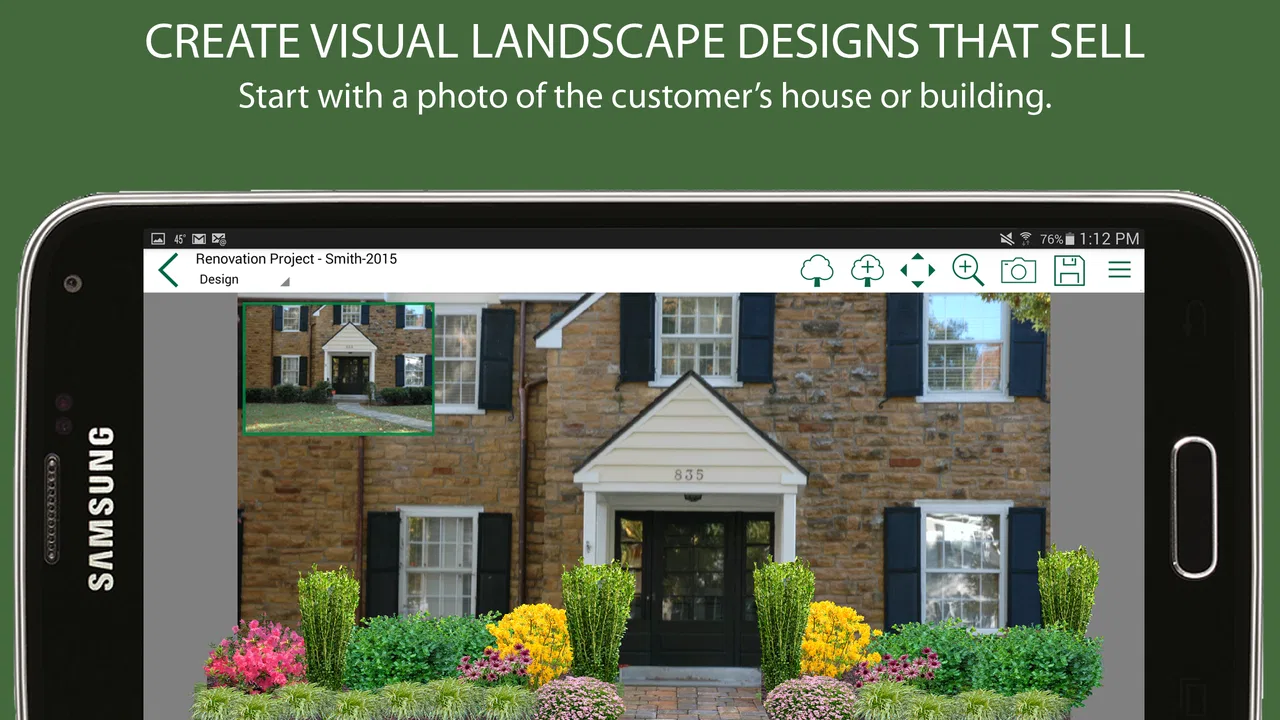
When I look at PRO Landscape Contractor, I see a business tool built around one practical idea: showing a landscaping customer what a proposed job could look like before the work begins. That visual approach matters because a written estimate can explain materials and labor, but it does not always help a homeowner imagine the finished garden, planting bed, patio edge, or outdoor renovation. In my experience, the app is most interesting when it turns a sales conversation into something the client can see and discuss.
This is a free business app from Drafix Software, Inc., aimed at professional landscape contractors rather than casual gardeners. It is available for Everyone and runs on Android devices using at least version 6.0 of the operating system. The app has reached over ten thousand installs, although its average rating sits at 1.8 from around fifty-eight ratings and twenty-five written reviews. That low score is important context: the concept is useful, but the experience clearly has friction for some users.
Turning a landscape idea into a visual sales conversation
The central capability is visual design connected to bidding. Instead of asking a customer to approve a landscape plan from words alone, I can use the project presentation as a way to explain the proposal. The value is not simply making a picture. It is helping both sides agree on what is being discussed before anyone orders materials or schedules a crew.
You May Also Like

 AccuWeather: Weather Radar
AccuWeather Review: A Quick, Clear Forecast for Everyday Decisions
For everyday plans, the best forecast is the one you can understand quickly. AccuWeather makes rain timing, radar, and local conditions easy to act on, with a few trade-offs.

 Hill Climb Racing
Why Hill Climb Racing Still Turns Crashes Into One More Run
A tiny car, a bumpy hill and one more upgrade: Hill Climb Racing keeps resurfacing because its simple chaos makes every near-miss feel personal.

 AliExpress - Shopping App
AliExpress Makes Global Shopping Feel Personal, but Shoppers Bear the Risk
AliExpress turns a global marketplace into a pocket-sized discovery engine. Its reach is useful, its shopping loop compelling, and its trade-offs easy to miss.

 Lords Mobile: Kingdom Wars
Lords Mobile Is a Kingdom-Building Routine, Not a Quick Match
A case-by-case verdict on the building, battles, device demands, and social commitments that make Lords Mobile rewarding for some players and exhausting for others.

 PDF Scanner app - TapScanner
TapScanner Makes Paperwork Easier to Capture, Check, and Share
TapScanner makes scanning with a phone feel less like a rescue operation and more like a dependable step in getting work done. Its capture tools are useful, though not flawless.

 Block Blast!
Block Blast! Shows How Much a Puzzle Game Can Leave Out
A quiet grid game shows why puzzle players increasingly value instant clarity, repeatable skill and low-pressure play—and where the genre still needs to catch up.
More From Our News Desk
View All News


That distinction makes the app more relevant to contractors who sell improvements directly to homeowners. A customer may understand “new planting area along the driveway,” yet still picture something completely different from the contractor’s intention. A visual proposal gives the conversation a reference point. I can point to the area, discuss the shape, explain the work involved, and identify where the customer wants changes.
The app’s purpose is therefore narrower and more useful than a general drawing program. It is not just about producing an attractive garden image. The design needs to support a commercial decision: what will be installed, how the job should be described, and why the quoted work makes sense. That is the reason I would judge it primarily as a landscape sales and estimating aid, not as a replacement for every professional design or accounting system.
For a small contractor, that focus can be valuable. Many jobs are won or lost during a short visit, when the customer is comparing several ideas and wants confidence that the contractor understands the property. A visual proposal can make the discussion more concrete without requiring the homeowner to interpret technical plans.
Why the visual approach can change the estimate conversation
A normal estimate often leads with quantities, labor, and materials. Those details are necessary, but they do not always create excitement or clarity. A visual design changes the order of the conversation. I can begin with the result the customer wants, then connect that result to the scope and price.
That can also expose disagreements early. If a customer sees a proposed bed extending farther than expected, or notices that a feature blocks part of a view, the issue can be discussed before installation. In that sense, the design is not only a sales image; it is a checkpoint against misunderstandings.
There is a useful trade-off here. A visual can make a proposal easier to understand, but it can also create expectations that are more precise than the final site conditions allow. Plants mature, lighting changes, materials vary, and existing properties rarely match a clean presentation perfectly. I would use the image as a communication tool while making sure the written scope remains the authority for what is actually included.
What using it in the field feels like
The most convincing use case is a contractor standing with a homeowner on the property. Rather than taking notes and promising to return with an idea, the contractor can work from the customer’s concerns and shape the proposal around them. The customer might want more privacy, a cleaner entrance, less exposed soil, or a more usable outdoor area. The visual element helps turn those broad requests into a specific direction.
I would not treat the first design as a final answer. The better workflow is iterative: establish the main problem, show a sensible direction, ask what feels wrong, and refine the proposal around the customer’s priorities. This is one of the less obvious strengths of a visual bidding process. It gives the homeowner something to react to, which is often easier than asking for a complete design brief at the start.
For a sales representative who handles several consultations, consistency is another practical benefit. A repeatable visual process can make proposals feel more organized than handwritten notes followed by a generic estimate. That does not automatically make the bid better, but it can help the contractor explain the same type of work clearly from one customer to the next.
A realistic driveway and front-yard scenario
Imagine I visit a homeowner who dislikes the bare strip between the driveway and the front door. The homeowner says the entrance feels unfinished but is unsure whether to add shrubs, low planting, or a more defined border. With a conventional conversation, I might describe several options and leave the customer trying to remember them later.
With a visual design and bid workflow, I can focus the discussion on the proposed result. We can examine the placement, talk about the amount of maintenance the homeowner is willing to accept, and identify whether the design supports the entrance rather than narrowing it. If the customer prefers a simpler arrangement, that change can be discussed before the proposal becomes a commitment.
The important result is not that the picture looks impressive. It is that the picture helps uncover the customer’s real priorities. Perhaps the homeowner cares less about adding plants than about making the path look intentional. Perhaps privacy matters more than color. Perhaps the budget will only support a smaller first phase. A visual conversation makes those choices easier to surface.
For this scenario, I would prepare the design before presenting the final bid, then use the meeting to confirm the scope line by line. I would also avoid treating the visual as a promise of exact plant size or finished maturity. The image should clarify the concept, while the proposal explains the actual work.
Three practical habits that make the capability more useful
First, I would begin with the customer’s problem rather than with the objects I want to add. Starting with “where should I place a tree?” can produce a decorative answer that misses the reason the customer called. Starting with “what is not working in this space?” leads to a more relevant design and a stronger bid.
Second, I would keep a clear separation between design decisions and pricing decisions. A customer may like a visual arrangement but need a smaller scope. Instead of abandoning the design, I would use it to identify phases: the essential work now and optional improvements later. This makes the visual proposal useful even when the first budget is limited.
Third, I would review the image from the customer’s viewpoint, not only from a designer’s viewpoint. Contractors naturally focus on installation details, but the homeowner may be thinking about the front-door approach, sightlines from a window, children using the yard, or how much upkeep will be required. A design that looks balanced on screen can still be a poor recommendation if it ignores daily life.
These habits are not flashy features, but they affect whether the app actually helps close a suitable job. The visual tool works best when it supports listening, revision, and precise explanation rather than replacing those parts of the sales process.
Where the workflow becomes slower
The same visual focus can become a weakness when a contractor needs to move very quickly. Creating a thoughtful presentation takes more attention than writing a short estimate. If the job is a straightforward maintenance visit, a small repair, or a repeat service with no design decision involved, the app may add unnecessary work.
There is also a learning curve in deciding how much detail to include. Too little visual information may fail to answer the customer’s questions. Too much can distract from the actual proposal or invite requests that were never part of the budget. I would develop a simple internal standard: show enough to explain the transformation, then use the estimate to define the exact deliverables.
The low average rating should make prospective users cautious about assuming a perfectly smooth experience. I would test the current version, 3.0, on the devices the team actually uses before making it central to the sales process. The app is free to download, but in-app purchases range from ninety-nine cents to thirty-nine dollars and ninety-nine cents per item, so a contractor should check which parts of the workflow require additional spending before rolling it out across a business.
That cost structure changes the recommendation slightly. A solo contractor may be comfortable paying only when a particular project justifies it. A larger team should first calculate how often the visual workflow will be used and whether every salesperson needs access. The right question is not whether the app costs nothing at the starting point, but whether its paid elements produce enough time saved or work won to justify the expense.
How it compares with ordinary alternatives
The usual alternatives are a handwritten sketch, a standard estimate document, a collection of reference photos, or a broader design program. Each has a place. A sketch is fast and flexible, but it can be hard for a customer to interpret. Reference photos communicate mood and materials, but they rarely show the customer’s own property accurately. A plain estimate is better for contractual clarity, but weak at communicating appearance.
A full professional design application may offer more control for complex plans, detailed construction work, or projects requiring technical documentation. I would choose that route when precision, documentation, or advanced design control matters more than speed during a sales visit. PRO Landscape Contractor makes more sense when the immediate goal is to help a client understand a proposed landscape job and move toward a bid.
That means it should not be judged as a universal replacement. It occupies the space between a rough sales sketch and a more elaborate design package. Its advantage is the connection between showing an idea and discussing the commercial scope. Its disadvantage is that contractors who already have a strong design-and-estimating system may see it as another step rather than a complete solution.
Who will gain the most from it
I think the strongest audience is a small or independent landscape contractor who regularly sells residential improvement work. If the business depends on customers understanding a transformation before approving it, the visual approach can make meetings more productive. It is especially relevant for jobs where the property already exists and the customer needs help imagining how changes will affect the space.
It may also suit a contractor who is good at installation but less comfortable presenting ideas. A visual proposal provides structure for the conversation. Instead of relying entirely on verbal persuasion, the contractor can explain a visible concept and connect it to the work involved.
On the other hand, I would skip it for a business focused almost entirely on recurring lawn care, simple maintenance, or standardized services. Those customers may care about reliability and scheduling rather than a visual design. I would also be cautious if the team needs a highly technical planning environment, extensive project administration, or a single system that manages every business function.
For a new contractor, the app could be useful as a way to make proposals feel more tangible, but it should not substitute for learning how to scope jobs properly. A beautiful presentation cannot correct an incomplete site assessment, an unrealistic labor allowance, or unclear exclusions. The visual capability helps sell the right work; it does not remove the need to price and plan that work responsibly.
Device expectations and setup decisions
Because the app requires Android 6.0 or later, compatibility should be checked before a field team depends on it. The minimum operating-system requirement is modest by current standards, but older devices can still differ in screen quality, speed, storage, and camera behavior. I would test the actual phone or tablet used during customer visits, not just assume that installation means a comfortable field experience.
I would also establish a backup routine for proposals. Any app used during sales meetings becomes part of the business process, so the team should know where final bid details live and how a proposal will be recovered if a device is unavailable. The app can support the presentation, but the business should not rely on a single screen as the only record of a customer’s requested work.
The Everyone content rating makes it broadly suitable from an age-classification perspective, but the intended audience is still professional. A homeowner could understand the visual presentation, yet the bidding workflow is most valuable when someone is using it to sell and define landscape services.
My overall recommendation
My view is positive about the core idea and cautious about the execution. The strongest reason to try PRO Landscape Contractor is its emphasis on showing a customer a landscape concept while discussing the bid. That can reduce vague conversations, reveal misunderstandings sooner, and give a contractor a more useful way to explain why a proposed job deserves its price.
The main reason not to adopt it immediately is the combination of a low average rating, possible paid elements, and the time required to create a meaningful visual proposal. I would test it on a limited number of real consultations first. If customers respond well and the workflow does not slow the team down, it could earn a place in the sales process. If most jobs are simple or the business already has a dependable design system, the extra step may not be worthwhile.
In short, I would recommend it to a contractor who wins work by helping homeowners picture a better outdoor space. I would not recommend treating it as a complete replacement for detailed estimating, technical design, or project management. Its real strength is making the proposal easier to see and discuss; the contractor still has to make sure the final scope, price, and expectations are accurate.
Developed by Drafix Software, Inc., the app remains an accessible experiment because the starting price is free and the minimum operating-system requirement is not demanding. Just approach it as a focused business instrument, test the paid options carefully, and judge it by whether it improves real customer conversations rather than by how polished a single presentation looks.
FAQs for PRO Landscape Contractor
01What is PRO Landscape Contractor used for?
PRO Landscape Contractor is designed for landscape professionals who need to create, present, and manage landscaping proposals more efficiently. It can help contractors visualize outdoor projects, prepare customer presentations, organize design ideas, and support the estimating and sales process. It is mainly aimed at businesses rather than casual homeowners, so its usefulness depends on how regularly you create landscape plans or client proposals.
02Is PRO Landscape Contractor suitable for beginners?
The application is intended for contractors and landscaping businesses, so beginners may need some time to understand its tools and workflow. Basic familiarity with landscape design, measurements, plant selections, and project planning will make the experience easier. Before downloading, users should review the available tutorials, documentation, and device requirements, since professional design software can be more demanding than a simple garden-planning app.
03Can I create realistic landscape designs with the app?
PRO Landscape Contractor focuses on helping users present proposed landscape projects visually, including layouts and design concepts that can be shared with customers. The quality of the final result depends on the available imagery, measurements, plant or hardscape libraries, and the contractor’s own design skills. It is useful for sales presentations and planning, but users should not assume that every visual automatically replaces detailed construction drawings.
04Does PRO Landscape Contractor include estimating or business management tools?
The software is primarily associated with landscape design and proposal presentation, but professional versions or related tools may also support estimating, project information, and customer-oriented documentation. The exact features can vary by edition, subscription, platform, or software package. Contractors should check the current product description carefully to confirm whether pricing, invoicing, scheduling, or other business-management functions are included.
05What should I check before downloading PRO Landscape Contractor?
Before downloading, confirm that your Android or iOS device is supported and that it has enough storage and processing power for professional design features. Also check whether the app requires an account, subscription, desktop companion, internet connection, or additional purchases. Review privacy permissions and export options as well, especially if you plan to store customer information or send finished proposals to clients.
Pros
- Detailed estimating tools help plan materials
- labor
- and project costs.
- Plant and hardscape libraries support more informed landscape design decisions.
- Useful proposal features can give clients a clearer view of planned work.
- Project organization helps keep designs
- estimates
- and client details together.
- Suitable for contractors handling both residential and commercial landscape jobs.
Cons
- The professional feature set may feel excessive for occasional or small projects.
- Learning the estimating and design tools can take time for new users.
- Some features may require paid access or additional software subscriptions.
- Large project files and detailed plans may use considerable device storage.
- The app may be less useful without current plant
- material
- and pricing data.

PRO Landscape Contractor
Gallery